Tips for everything

.

Wednesday, 24 March 2010

Software For Edit Photo

0 comments
FotoSketcher 1.96

FotoSketcher 1.96
FotoSketcher turns digital photos into beautiful pencil sketches or paintings in seconds. FotoSketcher can help you create images that really look like they have been hand drawn by the best artists. If you want to turn a portrait, the photograph of your house or even the picture of your pet into a black & white or colour pencil sketch, then look no further, FotoSketcher will do the job in a few seconds.
PhotoInstrument 3.4

PhotoInstrument 3.4
PhotoInstrument is a learning tool for editing and retouching digital photos.The graphics editor in PhotoInstruments allows you to adjust and process digital photos.
Ashampoo Photo Commander 8.1

Ashampoo Photo Commander 8.1
Ashampoo Photo Commander 8 is an all-in-one application for organizing, editing, sharing and presenting photo collections with additional audio and video playing and management capabilities. All the photo editing tools you need are included. Enhance your images with the one-click optimizer. Remove the red-eye effect, adjust colors, contrast, hue and many other parameters, resize, crop, rotate, add a wide range of special effects.
Tilt-Shift-Focus 1.15

Tilt-Shift-Focus 1.15
With Tilt-Shift-Focus you can easily edit photos to create fake miniatures, enhance or change the depth of field and focus area of your picture, or precisely soften details. Fake miniature and depth of field can improve the visual and artistic quality of your photographs and you can do all that with just a few clicks in the Tilt-Shift-Focus editor.
PhotoStyler 3.1.1

PhotoStyler 3.1.1
PhotoStyler is a light, quick and simple photo enhancer designed to make digital photos look like analog style pictures.
JAlbum 8.7.2 for Windows

JAlbum 8.7.2
JAlbum makes web albums of your digital images and aims to be the easiest to use and most powerful tool in this category – and free! With JAlbum you have full control of the look of the generated album, not just color theme and basic layout, still making an album is just a matter of drag and drop + a button click if you prefer to use one of the many existing looks.
JAlbum 8.7.2 for Mac

JAlbum 8.7.2
JAlbum makes web albums of your digital images and aims to be the easiest to use and most powerful tool in this category – and free! With JAlbum you have full control of the look of the generated album, not just color theme and basic layout, still making an album is just a matter of drag and drop + a button click if you prefer to use one of the many existing looks.
PrintSprint 1.5

PrintSprint 1.5
JAlbum makes web albums of your digital images and aims to be the easiest to use and most powerful tool in this category – and free! With JAlbum you have full control of the look of the generated album, not just color theme and basic layout, still making an album is just a matter of drag and drop + a button click if you prefer to use one of the many existing looks.
Pano2VR 2.3.2 for Mac

Pano2VR 2.3.2 for Mac
Pano2VR is an application that converts panoramic images into the QuickTime VR (QTVR) or Macromedia Flash 8 and Flash 9 formats with features such as customizable skins, hotspots and auto-rotation.
Photo Flash Maker Platinum 5.20

Photo Flash Maker Platinum 5.20
Photo Flash Maker Platinum is a Flash album creator, Flash to slideshow maker to create elegant flash photo slideshow to share on Web
Read full story

Tuesday, 23 March 2010

Getting Started Blogging-Zone Blogger

0 comments
http://www.newyorkpersonalinjuryattorneyblog.com/uploaded_images/Blogging-753608.jpg

Setting up a blog is generally a matter of following some online steps. The first thing any blogger (business or personal) needs to do is to find a blogging host. This could be a stand alone like Zanga or Blogger or a part of a social media site like MySpace or FaceBook.
You will need to register with a typical user name and password. From this point on you will need to pay attention to the instructions the blog site provides.
In most cases you can upload photos and most blog sites will also allow you to place audio and video in your blog. Most of the time this is placed as embedded link. This means that the link to the audio video or picture is placed on the blog from a secondary hosting source.
Unless you pay for blog space the blogging company will generally place a limit on the amount of space you can use to host files on their site. This is why the blogging site will not host most audio and video. Most bloggers will use video sites like YouTube to present any video clips they might want.
Photos can be stored at a site like Photobucket and then placed with an embedded link so the photo will show up on the site.
You will also be allowed to manage friends, comments and posts from your main page. Your profile can be edited or modified to include new achievements or events and the color scheme of your blog can also be adapted to express your personal taste.
Many blogging sites make Real Simple Syndication (RSS) feeds available as well to allow others to be advised when you post new material on your blog.
Many existing websites will have a page that is linked to the blog or frame the blog so site visitors can view their blog entries directly from the primary website. This can be important especially if the primary site is also a business website.
Blogging is just one of several marketing tools that can be integrated directly into an existing website design.
Most blogging sites will allow you to remove old blogs and edit existing ones whenever you need to.
In most cases the only individuals who can post comments are those who have registered with the blogging site. This is done for the protection of the company as well as the blogger. If a threat or malicious comment is made in response to your blog the blogging company can contact the poster or work with authorities if needed to find the person who made the comment. If no registration was required for blog comments then anyone could post their thoughts in your blog no matter how potentially harmful or threatening.
The next step is to actually post a blog entry. These can be general stream of consciousness thoughts or they could be more direct and informational.
Expect blog visits to be slow at first. When you develop several you will find visitation will increase and there will also be the expectation that you can and will provide new material to view on a regular basis.
Blogging can be a great way to add a personal touch to a personal or business website and can help customers and friends capture a sense of your humanity.
Read full story

Tips for maximizing Your Google AdSense Revenues-Zone Blogger

0 comments
http://digitalfewsure.typepad.com/.a/6a012876394d0e970c0120a74d50e9970b-500wi
Despite what you may hear, the Google AdSense program is not for everyone. There are some types of web sites that do poorly no matter how hard the owners try, and there are others that should be doing well but the webmaster simply isn't putting in the effort to make things happen. Here are some tips to make AdSense work better for you. If you do them all and you're still not having any luck, then you just might be running one of those sites that don't make money
1. Determine if your visitors are 'in the mood'
Like I mentioned at the top of this article, some web sites just don't work with pay-per-click programs. The best performing sites fall into one of these categories:
' Sites where users go and expect to buy something while they are there. E-commerce sites fit the bill here.. ' Sites where users go to find specific information on something that they want to buy now. Music and video review sites, vacation information sites, resume building sites, etc. You don't have to actually be selling these types of things; your site can just be a mecca for information pertaining to these things. Then, when the visitor comes to read your content, they are more likely to click on your ads.
' Sites where people who have disposable income and a credit card like to visit. This includes sites with money management, investing and lifestyle content.
' Sites that draw a large amount of new users every day. Free coupon sites and 'How to' sites are good examples. ' Sites where people go who expect to read ads. Classified ads and shopping comparison sites fit into this category.
2. Make sure that your visitors don't feel that you just want to grab their money
Give them plenty of relevant and well-written content. If writing isn't your best skill then hire someone to do it for you. Good content brings steady traffic and steady traffic pays the bills.
3. Play by the rules
Google has some very specific Terms of Service (https://www.google.com/adsense/policies) for participating in their AdSense program. Learn those rules and follow them so you don't lose all of your investment by getting shut out.
4. Use the tools that Google gives you
Google gives you tools for determining the best keywords for your site, measuring ad performance, and setting up different ad 'channels' for fine-tuning ad results. These guys and girls are the 800 lb. Gorillas in the Pay-Per-Click market. They didn't build these tools just to keep their programmers busy. Take advantage of their knowledge for they are very big and you are not!
5. Tweak, fine-tune and then tweak again
You should never be happy with your AdSense performance. If it's good, then you need to make it great. If it's great then you need to make it amazing. If it's amazing then you need to take it to the UPS club. The UPS club? Google sends all checks over $10,000 per month to the webmaster via UPS overnight delivery. Now there's a club that I wouldn't mind belonging to.
6. Get more traffic
No matter how much traffic you have, you need more. More eyeballs translate to more clicks. Even if you're only pulling a 2% click-through. That's a lot of clicks when you have thousands of visitors each day.
7. Experiment with new keywords
New keywords can bring new ads and new eyeballs along with it. Set up some new pages on your site and experiment with different content. Once you get something that's working then refer back to Tip # 5.
You can see results in near real time when you use Google's AdWords. Don't be afraid to be different. If something that everyone else is doing doesn't work for you, then invent something that does work and get it on your site.
Read full story

Top 10 Blogger Hacks and Tips-Zone Blogger

0 comments
Hey MakeUseOf! I thought I would share with you what I have learned about Blogger’s Blogspot blogging platform over the last 8 months or so. I jumped into the new Blogger almost immediately after its beta launch and then I wanted to customize it – You know, make it my own.
So I went out looking for how to do it. And here is that wisdom I uncovered. Consider it a gift from me to you. Poor old Blogger gets a bad wrap, namely because people do not know how to manipulate it. I hope this article helps you guys out and if you have any others please let me know in the comments…
1. Removing The Blogger Bar
I hated the blogger bar across the top of my Web site because it didn’t really go with my template and I already had a Google search bar integrated. So I went on a mission to remove it and de-bloggerify my blog. I searched far and wide and for some reason kept hitting a dead end. It turns out that the code used to change the old blogger templates no longer works! So after tracking down the CSS changes here is how I did it:
Blogger Tips - Removing The Blogger Bar
All you need to do is add the following CSS to your template under edit HTML. You need to put in anywhere in your template between the
Read full story

How To Add Twitter Updates to Blogger-Zone Blogger

0 comments

1.Log in to your dashboard--> layout- ->Page Elements

2.Click on 'Add a Gadget' on the sidebar.

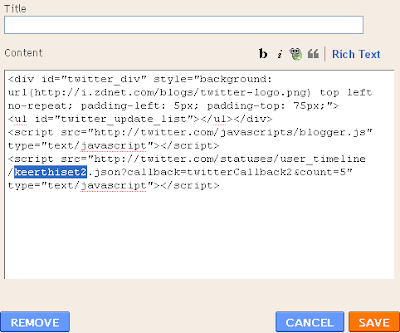
3.Select 'HTML/Javascript' and add the code given below and click save.


    NOTE : Remember to replace TWITTER-USERNAME with your real twitter username.Look at the example below.

    Now you are done.
    Read full story
     
    Blogging Tips Blogs - BlogCatalog Blog Directory

    Followers

    Zone Blogger © 2008 Business Ads Ready is Designed by Ipiet Supported by Tadpole's Notez