Tips for everything

.
Showing posts with label Facebook. Show all posts

Thursday, 25 March 2010

Great 25 Facebook Tips and Tricks

0 comments

1. Hide Your Online Status From Selected Friends:

So you want to use Facebook chat but don’t want some people to see your online status? Simply open up the Facebook Chat and click on Friends List. Start creating a new list called BlockList.
Once the list is created, add those friends to the list that you want to appear offline to. When the list is complete, hover your mouse to the little green icon adjacent to the list and click Go Offline. Bingo! You will now appear offline to everybody in the BlockList.

2. View a Friend’s Profile Without Messy Applications:

If you are like me, you often get annoyed by the dozens of silly applications that people have added to their profile. Here’s a Grease Monkey script that allows you to view any profile without all those applications. Remember: the Mozilla Firefox web browser is a prerequisite for running Greasemonkey.

3. Display Your Facebook Status On Your Wordpress Blog:

Want to display your Facebook status updates on your Wordpress blog? There is a plugin that does exactly that. StatusPress lets you display your status updates to a widget on your Wordpress blog.

4. Access Facebook Chat Through Your Desktop:

No need to go to Facebook.com if all you want to do is use Facebook chat. You can do it right from your desktop using clients like social.im , Adium or ChitChat.
ChitChat

5. Update Facebook Status From Firefox:

If you are a firefox addict you don’t need to use any other software to update your Facebook status. Simply install the FireStatus add-on and update your status right from your browser. You can also use the Facebook Toolbar to completely manage Facebook from your Firefox browser.

6. Create A Photo Collage From Pictures Of Your Facebook Friends:

Easily create a photo collage from profile pictures of all your Facebook friends using a simple Facebook app called Photo Collage.

7. Add A New friend But Hide It From Your Status Update:

A great tutorial by Tim Watson walks you through the process of hiding specific actions from your status updates.

8. Schedule Facebook Messages To Be Send Later:

If you want to schedule your Facebook messages to be send sometime in the future, Sendible is a great tool to do that. You can also use Sendible to schedule your status updates.
Sendible

9. How To Share Flickr Photos On Facebook:

My Flickr is a Facebook application that lets you display your Flickr photos and photo sets on Facebook so your friends can view and comment on them without leaving Facebook.

10. How To Download Facebook Photo Albums:

Ever felt the need to download complete photo albums from Facebook. You can easily do it with either a Windows desktop application named FotoBounce or a great Firefox add-on FacePad.
Fotobounce

11. Upload Photos On Facebook From Your Phone:

All the smart phones like iPhone and Blackberry make it simple to upload photos to your Facebook account but how would you do it if you have a regular phone? Here is a great tutorial to walk you through that.

12. Magic Circles On Facebook:

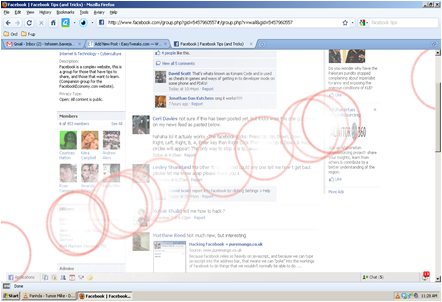
You might have heard about the Konami code that makes red blurry circles on your Facebook page. This might be one of the most popular Facebook hidden tricks. Here’s how to do it:
Press Up, Up, Down, Down, Left, Right, Left, Right, B, A, Enter key then press up & down & Magic circles will appear!
To stop them simply reload your page.
MagicCircles

13. Use Your Facebook Like A Pirate:

Do you love talking like a pirate? You can set your Facebook to appear like a pirate page by going into Current Language Settings and setting it to English (Pirate).
Pirate

14. How To Insert Cool Symbols In Your Status Updates:
Make your status updates interesting by inserting cool symbols. Simply copying them from this list and pasting in your status updates.

15. Automatically Poke Friends That Poke You:

Don’t have enough time to poke back friends who poke you on Facebook? Automate it with a Grease Monkey script called Facebook Autopoke.

16. Upload Photos From PicasaTo Facebook:

Upload photos to your Facebook account directly from Picasa using the Picasa app for Facebook. You can also upload the Picasa captions and resize your photos before uploading them to Facebook.

17. Search Facebook Like A Pro:

Not everybody knows how powerful Facebook search is. Similar to any large search engine, Facebook search has a lot of advanced options to help you search like a pro. For example if you are looking for a person named John Marsh and filter your results down to only people who are married, you can try name: John Marsh status:married. A complete list of search tips for Facebook can be found here.
Search

18. How To Update Facebook Status From Gmail:

Facebook gadget for Gmail allows you to update your Facebook status right from your Gmail.
Gadget

19. How To Access Gmail From Facebook:

If you seldom have to leave Facebook just to go check your Gmail inbox, check out Fmail. It is a great application that lets you check your Gmail from within your Facebook inbox.

20. See Facebook Twitter style:

If you love Twitter more than Facebook, you can view your Facebook just like you view your Twitter using this grease monkey script.

21. Import Facebook Friends To Twitter:

FB140 is a simple tool that lets you find all your Facebook friends that are using Twitter so you can easily follow them.

22. Access Facebook From Microsoft Outlook:

This is a great tip for people attending colleges or working in places that block Facebook, but allow you access to Microsoft Outlook. Simple install the FBlook plugin and access Facebook from Outlook.

23. Display Your Facebook Status Upside Down:

This is a cool and fun trick. To display upside down status updates, simply head over to FlipText and type in your status. Then simply click on Flip Text and copy-paste the upside down text into your Facebook status box.
FlipText

24. Update Facebook Status Using Twitter:

Wouldn’t you love to update your status on both Facebook and Twitter at the same time. Just install the Twitter application for Facebook. Once synced, your tweets including the #fb tag would automatically be posted as status updates on your Facebook.

25. Download Videos From Facebook:

Facebook has one of the largest collection of user uploaded videos.You can download most of the videos from Facebook by using a client like SpeedBit or DownFacbook.
SpeedBit
Read full story

Wednesday, 24 March 2010

Twitter or Facebook?

0 comments
twitter-vs-facebook.jpg
                         Twitter or Facebook? Or Both? 

The phenomenon of social networking is still in its infancy and it remains to be seen exactly which network might become the 800-pound gorilla in the space. It is reminiscent of the dotcom 90s, when I worked in the search industry; dozens of venture-backed search firms battled for dominance and search appeared to become a commodity, with limited monetization potential, or so we all thought at the time.
There are now so many social networks vying for users that even the most elite “Digerati” have trouble keeping up with the ever-shifting landscape. And most are still struggling to find effective monetization strategies, casting doubt on their long term survival and pointing to massive consolidation at some point.

The Evolution of Social Networking Compared to Search

In the now-infamous dotcom era, Yahoo, Lycos, Excite and others evolved into portals in a desperate attempt to find ways to make money, since nobody had really found effective ways to monetize search. That was, until companies like Goto.com (which became Overture and was eventually bought by Yahoo) and Google invented the concept of paid search and contextual, pay-to-click advertising models. The rest is history and we all knew who won the war.
So it seems today that applications like Twitter and Facebook, while attracting new users at astounding rates have not fully defined their business models and the 800-pound gorilla has yet to emerge. It is still early in the game and, as with search in the mid 90s, the eventual winners in the social networking space may not even yet exist, but I would argue that Twitter and Facebook are emerging as potential contenders to dominate.
The differences between the two networks are substantial and in some ways a direct comparison between the two is actually difficult to make. Twitter is simple and feels like Google did in 1998, while Facebook offers a portal-like interface somewhat reminiscent of Yahoo.

Key Elements of Facebook and Twitter

Facebook appeals to people looking to reconnect with old friends and family members or find new friends online; the mashup of features like email, instant messaging, image and video sharing, etc. feels familiar, while Twitter is a bit harder to get your arms around at first.
Most people can very quickly grasp how to use Facebook to connect to friends and family, using it to share thoughts, images, etc. Like MySpace but more geared to adults than teens, Facebook is a social networking Portal; beckoning you not to leave but rather to stick around and communicate within the network.
Twitter on the other hand, encourages you grab ideals in byte-size chunks and use your updates as jumping off points to other places or just let others know what you’re up to at any given moment.

Why People Love Facebook

Facebook appeals to social animals and can be very addicting to people who have an insatiable appetite to stay connected with friends and make new acquaintances. In fact, some people report they rarely use email or IM tools anymore in their online social communications anymore, relying almost entirely on Facebook for email, chat, image and video sharing.
Facebook addicts prefer the social portal model versus having to log into AIM, Yahoo Messenger, Gmail, Hotmail, Flickr, YouTube, MySpace, etc. Instead, Facebook gives them a single alternative to all these applications, with one login and interface to manage their online social interaction needs. This largely explains the explosive growth Facebook continues to experience and why the company reportedly invested $200 million in data center upgrades last year to keep up with demand!

Why People Love Twitter

The usefulness of Twitter is not readily as obvious to some people as Facebook; although it may be more addictive once you get the hang of Tweeting; you get more immediate responses and it seems to live somewhere between the worlds of email, instant messaging and blogging. Twitter encourages constant “linking out” to anywhere and, in that respect, is more analogous to a pure search engine; another way to find people and content all over the Net.
Twitter has quickly built brand awareness and a loyal following, especially among the technically adept; bloggers, online marketers, evangelists, basically anyone with something to promote seem to find Twitter extremely valuable.
When asked why they love Twitter, users say like “I can ask a question and get an instantaneous response”. They crave the ability to “tap into the collective consciousness” of others on the network, bouncing ideas off others with whom they would otherwise have no means of connecting. Twitter addicts claim it’s like the old fashioned water cooler, where people can gather to shoot the breeze on whatever topic is on their minds. Twitter is like a communications stream you dive into for an invigorating swim.

Different Communication Styles for Different Social Settings

Let’s say you go to a wedding or other social gathering where lots of people know each other. The style and tone of communication there will be more like using Facebook; you chat with old friends and acquaintances, mixing and mingling in an intimate manner. In this setting, people tend to feel more relaxed and “in their element”. Conversations are familiar and center on shared experiences and connections.
Now, when you go to a large party or social event where you don’t know most of the people in attendance, you will use a very different style of communication, more like Twitter; you want to meet people and somehow make yourself known, stand out from the crowd, make an impression, self promote and make new connections. Twitter is like getting the podium and not everyone feels comfortable or knows how to stand comfortably in the spotlight.
In fact, almost all of us, when first approaching Twitter, tend to use it to post useless updates like “Going to lunch”, thinking of it as a another tool to communicate with friends, when in fact, it is more like stepping on to a stage, where you are communicating with an audience and quickly find that you need to find a voice and say something useful and interesting or quickly lose the attention of your audience. People refer to Twitter as a mini or micro blogging platform.

So Which Social Network is the Best?

While zealots will immediately point to either Twitter or Facebook as being superior, the truth is that each has its advantages and disadvantages and will tend to appeal more to different types of people and for different reasons. Each can have great or little value to anyone; it really depends on what you are trying to accomplish in a given situation. Consider some of the pros and cons of each network:

Twitter Pros

  • Easy to navigate and update, link to and promote anything
  • Reach far beyond your inner circle of friends
  • One feed pools all users; anyone can follow anyone else unless blocked
  • Pure communication tool, rapid responsiveness
  • You don’t have to be logged in to get updates; you can just use an RSS reader
  • Very interactive, extensible messaging platform with open APIs
  • Many other applications being developed (Twitterific, Summize, Twhirl, etc.)
  • Potential SMS text messaging revenue from wireless networks (although Twitter states they are not currently getting any cut)
  • Potential future advertising and/or enterprise subscription-based revenue streams
  • With its “thin” overhead, Twitter is probably more scalable than Facebook, giving it a cost advantage

Twitter Cons

  • Limited functionality; find people, send brief messages, direct replies
  • Limited to 140 characters per update
  • Not all people find it immediately useful
  • Over-emphasis on follower counts
  • Easily abused for spam and increasing the noise level
  • Relatively smaller installed user base
  • As yet no readily apparent monetization strategy

Facebook Pros

  • Application mashup; find people, make connections, email, instant messaging, image/video sharing, etc.
  • Most people can quickly grasp the value of connecting with friends, family and established contacts; some people report they use Facebook instead of email and IM
  • More emphasis on deep connections with others vs. who has the most connections
  • “True Friends” feature increases your transparency to selected connections; almost like having private and public profiles
  • Huge, rapidly growing installed user base
  • Inherit stickiness, third party applications, “gift giving” and personal data collection make Facebook a powerful advertising platform

Facebook Cons

  • More difficult to navigate and update
  • Requires investment of time to realize sustained benefit
  • Opt in model requires a user to allow others to connect
  • Less immediate responses; unless you stay logged on continually
  • Overhead of mashup and “thick” applications could limit scalability, bloat cost structure

The Future of Social Networking

In the end, both Twitter and Facebook are simply communication tools; both will continue to evolve and morph as users find new ways to extract value and either network may or may become a long term winner in the rapidly evolving social networking space. Ultimately, the fact remains to be seen whether either application has a profitable, scalable and sustainable business model or whether the exit strategy is simply to be acquired.
As we learned in the search space, consolidation will eventually prevail. Unless they can find a way to turn all those eyeballs into profits, social networks will lose relevance. It does seem obvious that the venture capitalists are betting they will not only continue to enjoy tremendous growth but will also successfully monetize all that traffic.
But, will either Twitter or Facebook become the next Google or will they fade into the rear view mirror of technological and social evolution? What do you think?
Read full story

Tuesday, 23 March 2010

How To Setup/Create Facebook Fan Page For Blogger-Zone Blogger

0 comments
In this article I hope to explain how to create a facebook fan page for your blog,and after that how to setup it to publish your blog post/articles.After you doing this, your facebook friends can read your blog post from your facebook fan page and can become fans of your blog.This is very helpful to become your blog more popular.To do this follow the steps below.


1.First login to your Facebook Account.

2.Now go to this link:

http://www.facebook.com/pages/create.php

3.You can see a screen like below.Fill the information and click on "Create Page".


4.Now you have created a facebook fan page.You can see a screen like this:


Now we must import your blog post to this fan page.Click on "Edit Page".


5.In next window click on "Edit" link under "Notes" section.


You can see a screen like this:


6.Now click on "Import a blog".


7.Give your website URL and click on "Start Importing".


8.Now you can see a confirmation window:


Click on "Confirm Import".


9.You are done.Now when you publish a blog post,it will automatically publish your facebook fan page.


You can add a picture for your fan page,configure settings,... as you like.

You can see my facebook fan pages from here:

http://www.facebook.com/pages/Auto-Trader-Zone/418057363974

http://www.facebook.com/pages/Premium-Blogger-Templates/10150130448820134

http://www.facebook.com/pages/Blogger-Tips/172150707452
Read full story

Monday, 22 March 2010

RSS to Twitter&The Big Boys Have Arrived

0 comments

(Google + Feedburner) = Death_of (Twitterfeed + RSS2Twitter 
+DLVR.it) ?
(Google + Feedburner) = Death_of (Twitterfeed + RSS2Twitter +DLVR.it) ?
I have posted before about how you can capitalize on your Twitter social community to increase traffic onto your blog. Regularly tweeting the new posts on your blog is the secret. I tweet a few thousand posts per month, accounting for over 100,000+ visits on my aggregator blogs.
What tools are on the market to automatically convert RSS feeds to Twitter, and which is the best? An overview.

Twitterfeed

My aggregator blogs collect the latest articles from over 1,000 different special interest sites, be it nonprofit blogs, aidworker blogs, social media sites or humanitarian news sites. These sites aggregate 20,000+ articles per month, so it would be a full-time job if I’d to tweet these posts manually. No, I use an RSS-to-Twitter tool to make my life easy. Up to recently, I used Twitterfeed which takes the RSS feed from my blogs and converts the feed items into tweets automatically. For each site, I tweet a maximum of 5 updates every half an hour.
Twitterfeed did its job pretty well, feeding not only to Twitter, but also to Identi.ca, Facebook,… It is highly configurable to include or exclude RSS posts based on keywords in the title. Twitterfeed can add words before or after the post title and uses different URL shorteners, including “the king of short”, bit.ly.
Twitterfeed: Feed configuration screen
Mario, the guy behind Twitterfeed, did a pretty good job in providing support via both Twitter and GetSatisfaction. What started  small, grew into a machine with 700,000 feeds publishing millions of posts a day. Back in May, Betaworks and TAG invested in Twitterfeed, and the service went from a side project to a company. They kicked off a major overhaul of the site both in terms of backend systems and look-and-feel.
Unfortunately, migrations are migraines, and Twitterfeed’s uptime started to become erratic. Feeds would no longer feed, or feed tweets ad hoc. To top it off, the website used to configure feeds became extremely slow. Users pulled out their hair, me included.

RSS2Twitter

Looking for alternatives, I stumbled upon RSS2Twitter, which up to today still runs in beta. RSS2Twitter has a clean and simple user interface, allowing users to easily combine input feeds with different Twitter accounts. The drawback is the lack of different features which made Twitterfeed so succesful.
RSS2Twitter: simple but barebones
While you could prefix and suffix your tweets, and filter RSS items based on keywords, it could only feed into Twitter and no other microblogs or social media. It used its own URL shortener, url4.eu, so you could not take advantage of aggregated shortener’s statistics which bit.ly gave. I admit though: RSS2Twitter’s built-in statistics are better than bit.ly’s, and more geared to a “Twitter user”.
So I gave it a shot. When my feeds on Twitterfeed went down for a couple of days, I migrated my most prominent feeds onto RSS2Twitter. And it worked. It worked until… it stopped working.. Or should I say, until it worked too much: On one fine day, at each update interval – 30 minutes in my case -, all feed items would be tweeted, and not the 3 to 5 I wanted tweeted per update.
This happened, of course, during a few days where I was really busy at work, and not monitoring what Twitter activity I generated. Soon my Twitter-followers were complaining about the excessive posting. Sure enough, nobody wants to get 20 to 30 tweets every half hour, many of them repeats. RSS2Twitter support folks admitted this was a problem,  but it took for ages to solve. Good enough for me to disengage.

Dlvr.it

Just around the time of the RSS2Twitter debacle, Twitterfeed came back up, so I reactivated my feeds on my good old trusted service. Until the hiccups from about a week ago, that is. Feeds randomly stopped, the user interface changed, making it impossible to properly configure different feeds. Worse of all it took over three minutes to load the login screen. Once I clocked 15 minutes just to log in.
Today Mario apologized for the hiccups, explaining they are once again migrating the database and backend systems, but unfortunately, users are not very patient.
And that includes me. I tweeted “Does anyone know an alternative to Twitterfeed?” and sure enough, out of the blue, a reply came “Try us. We are in private beta. dlvr.it”. So I registered to be included in the beta test for dlvr.it and have been using it for a week now (check at the bottom of this post if you are interested in participating in their beta too).
I like dlvr.it… It is reliable and highly configurable. It lets you easily combine different inputs and outputs, just like RSS2Twitter while it has just as many features as Twitterfeed.
dlvr.it combines the ease of use from RSS2Twitter with Twitterfeeds
 features
dlvr.it: combines the best of RSS2Twitter and Twitterfeed
An additional feature, particularly useful for sites which get many updates per hour like my aggregation sites: they let you send tweets every 15 minutes. Twitterfeed and RSS2Twitter are limited to one update per 30 minutes. Unfortunately, for the moment they only feed to Twitter, and use their own shortening service converting all links to “dlvr.it” shorturls.
They do provide interesting statistics, which will keep you busy analysing your tweets to your heart’s content.

Hootsuite

One RSS-to-Twitter service I have not played with yet, is Hootsuite, and online Twitter management tool which just won Mashable’s Open Web Award for best Twitter application.
The definitive plus is the seemless integration of the RSS-to-Twitter functionality within its multi-account Twitter tool, so you “have it all” in one package. The RSS-to-Twitter features are rather meager: while for each RSS, you can define which of one or many Twitter accounts you want to feed into, you can only feed once per hour at max. You can prefix, but not suffix a tweet, and there are no filters available. Hootsuite only uses the ow.ly URLshortener.
Hootsuite integrates RSS-to-Twitter functionality in its Twitter 
tool
Hootsuite integrates RSS-to-Twitter functionality in its Twitter tool

Google and Feedburner, tackling the market once more?

And then, two days ago content hogger Google announced they were entering both the URLshorteners and the RSS-to-Twitter market. “Two birds with one stone”, they must have thought. Feedburner, bought by Google for 100 million two years ago, now lets you feed the RSS feeds “burned” by their service onto Twitter. And they made it simple: Just go to your Feedburner’s feed configuration menu, click on the “Publicize” tab, select “Socialize” and off you go.
Feedburner makes it easy to tweet your feed
Feedburner, being “king of feeds” since ages, knows its business, so no surprise they included features not to be found in the other RSS-to-Twitter engines. They allow the automatic generation of hashtags, based on the categories tags you use for your posts. The updates onto Twitter don’t work on a fix interval, but your post is tweeted the moment Feedburner sees it in your feed. By default, Feedburner updates your feed every 30 minutes, but if your blog or website is configured to ping Feedburner automatically, then once a new post is published Feedburner will immediate pull in your updated feed and tweet the post. Neat!
While they were at it, they also convert all links to their newly introduced URL shortening service, “goo.gl”. It does not seem they provide any statistics at the moment, but it is easy to imagine the integration with Google Analytics, the “king of webstats”, is just around the corner.
While bit.ly, which only recently conquered the #1 place in the URLshorteners business, is putting up a nice fight to counter goo.gl, it might very well be that with its vast data infrastructure and know-how, Google will work all other RSS-to-Twitter services out of the market.
Time will tell, but one thing is for sure: whoever shows the most features, the highest speed and uptime, as well as the best integration, will win. Let the battle for URLshorteners and RSS-to-Twitter services begin.
Update:
The dlvr.it service is currently in “private beta”. You need to register for an invitation. After this post was published, the kind folks at dlvr.it gave us 10 invitations for our readers.
If you are interested in an invite, leave a comment on this post, or email me. Will send you the invite code.
No strings attached, though feedback during the beta tests are highly appreciated by the dlvr.it crowd!
Read full story
 
Blogging Tips Blogs - BlogCatalog Blog Directory

Followers

Zone Blogger © 2008 Business Ads Ready is Designed by Ipiet Supported by Tadpole's Notez